

Have you ever wondered if someone has blocked you on Instagram? It’s a common concern in today’s social media landscape, and knowing how to tell if you’re blocked on Instagram can help you understand your online relationships better. Whether it’s a friend, family member, or colleague, being blocked can feel confusing and sometimes hurtful.
Instagram doesn’t send notifications when someone blocks you, which makes it challenging to know for certain. However, there are several telltale signs that can help you determine if you’ve been blocked. In this comprehensive guide, we’ll explore the most reliable methods to figure out if someone has blocked you on Instagram.
What Does It Mean to Be Blocked on Instagram?
When someone blocks you on Instagram, they’re essentially making their profile completely invisible to you. This means you won’t be able to see their posts, stories, comments, or even search for their profile. It’s Instagram’s way of allowing users to control who can interact with their content.
Being blocked is different from being unfollowed or restricted. When you’re unfollowed, you can still see the person’s public posts and interact with them. When you’re restricted, you can see their content, but your interactions are limited.
7 Clear Signs You’ve Been Blocked on Instagram
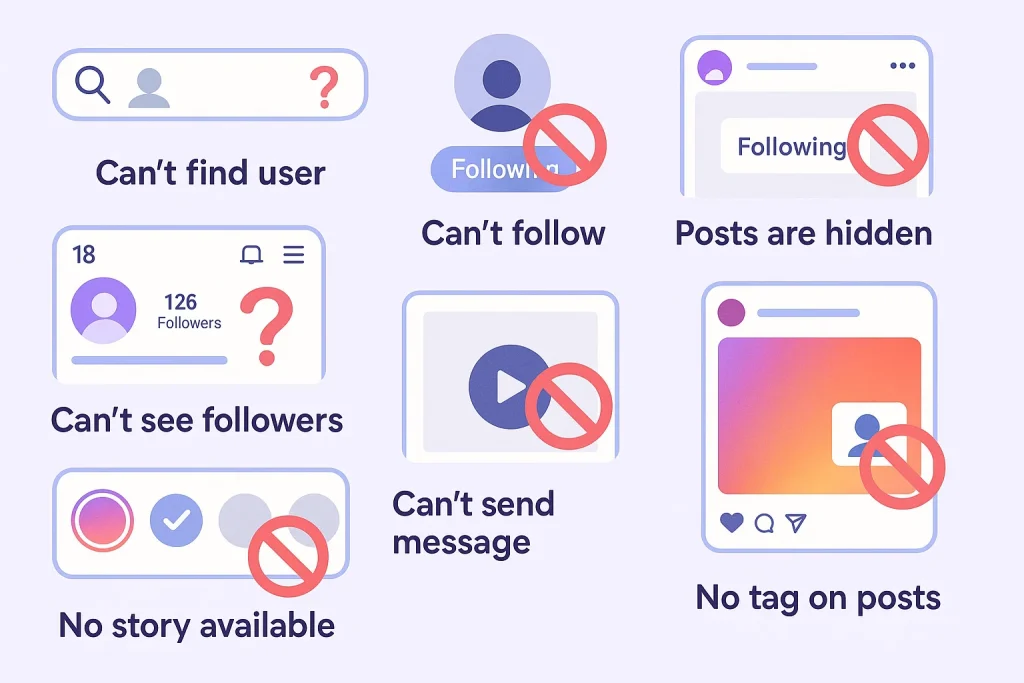
1. You Can’t Find Their Profile in Search
The most obvious sign that you’ve been blocked is when you can’t find someone’s profile through Instagram’s search function. Here’s how to check:
- Open Instagram and tap the search icon
- Type the person’s username or full name
- Look through the search results
If their profile doesn’t appear in the search results, and you’re certain you’re spelling their name correctly, this could indicate you’ve been blocked. However, it’s also possible they’ve deactivated their account or changed their username.
2. Their Profile Shows “User Not Found” or “No Posts Yet”
If you have a direct link to their profile or remember their exact username, try accessing their profile directly. When you’re blocked, you’ll typically see one of these messages:
- “User not found” – This appears when you try to access their profile
- “No Posts Yet” – Their profile appears but shows no content
- A blank profile with zero posts, followers, and following counts
These indicators strongly suggest you’ve been blocked, especially if you know the person actively uses Instagram.
3. Previous Conversations Disappear from Direct Messages
Check your direct messages for any previous conversations with the person. When someone blocks you on Instagram:
- Your message thread may completely disappear
- The conversation might still exist, but you can’t send new messages
- Their profile picture may appear as a generic gray circle
This is one of the most reliable ways to confirm if you’ve been blocked, as message threads typically remain visible even after unfollowing.
4. You Can’t See Their Comments on Mutual Friends’ Posts
If you and the person have mutual friends, check the comments on those friends’ posts. When you’re blocked:
- You won’t see any comments from the person who blocked you
- Their likes won’t be visible to you
- You won’t see them tagged in photos by mutual friends
This method works well because it shows how the block affects your ability to see their activity across the platform.
5. They Don’t Appear in Your Followers or Following Lists
If you previously followed each other, check your followers and following lists. When someone blocks you:
- They’ll automatically be removed from your followers list
- You’ll be removed from their followers list
- The mutual follow relationship is completely severed
This happens immediately when someone blocks you, regardless of how long you’ve been following each other.
6. Group Conversations Reveal Missing Messages
If you’re part of a group chat that includes the person who may have blocked you, you might notice:
- Missing messages in the conversation flow
- Responses that seem out of context
- Other participants responding to messages you can’t see
This occurs because Instagram hides messages from blocked users even in group settings.
7. Ask a Mutual Friend to Check
One of the most definitive ways to confirm if you’ve been blocked is to ask a mutual friend to check the person’s profile. If they can see the profile and recent posts while you can’t, it’s a clear indication that you’ve been blocked.
However, be mindful of privacy and relationships when using this method. Only ask trusted friends, and be prepared for potentially awkward conversations.
How to Double-Check Using a Different Account
If you want to be absolutely certain, you can create a new Instagram account or use an existing alternative account to search for the person’s profile. This method is reliable because:
- A new account won’t be blocked by the person
- You can see their profile as it appears to other users
- You’ll be able to confirm whether their account is active
Remember to use this method respectfully and avoid attempting to contact the person through the new account if they’ve blocked your main account.
Common Misconceptions About Instagram Blocking
Being Blocked vs. Being Restricted
Many people confuse being blocked with being restricted. Here’s the key difference:
- Blocked: You can’t see their profile, posts, or interact with them at all
- Restricted: You can see their profile, but your comments are hidden from others, and you don’t receive notifications about their activity
Deactivated Account vs. Blocked Account
Sometimes what appears to be a block is actually a deactivated account. The signs are similar, but there are subtle differences:
- Deactivated account: No one can find or see the profile
- Blocked account: Others can see the profile, but you specifically cannot
What to Do if You’ve Been Blocked
Discovering that someone has blocked you can be disappointing, but it’s important to handle the situation maturely:
- Respect their decision: Everyone has the right to control their social media experience
- Don’t try to circumvent the block: Attempting to contact them through other accounts or methods can be considered harassment
- Reflect on the relationship: Consider whether there were any issues that led to the block
- Move on: Focus on positive relationships and connections
Technical Reasons That Might Mimic Being Blocked
Before concluding that you’ve been blocked, consider these technical possibilities:
- App glitches: Sometimes Instagram experiences bugs that affect profile visibility
- Network issues: Poor internet connection can prevent profiles from loading properly
- Account suspension: Instagram may have temporarily suspended the account
- Username changes: The person might have changed their username
Try refreshing the app, checking your internet connection, or waiting a few hours before drawing conclusions.
Privacy Settings That Can Affect Visibility
Instagram offers various privacy settings that can make someone’s profile less visible without blocking you:
- Private account: You’ll need to request to follow them to see their content
- Hidden stories: They may have hidden their stories from you specifically
- Close friends lists: Some content might only be visible to close friends
Understanding these settings can help you differentiate between privacy measures and actual blocking.
The Psychology Behind Instagram Blocking
People block others on Instagram for various reasons, and it’s not always personal:
- Privacy concerns
- Ending toxic relationships
- Professional boundaries
- Mental health considerations
- Avoiding unwanted interactions
Understanding these motivations can help you process being blocked more constructively.
Maintaining Healthy Social Media Relationships
To avoid being blocked and maintain positive online relationships:
- Respect others’ boundaries and privacy
- Avoid excessive commenting or messaging
- Be mindful of the content you share and tag others in
- Communicate openly about any issues
- Remember that social media isn’t always reflective of real-life relationships
When to Reach Out Through Other Channels
In some cases, being blocked on Instagram might be a misunderstanding or accident. Consider reaching out through other channels if:
- You have a close personal relationship with the person
- There’s a legitimate reason for needing to communicate
- You believe the block was accidental
However, always respect their response and don’t persist if they confirm the block was intentional.
Conclusion
Learning how to tell if you’re blocked on Instagram can help you understand your online relationships better and manage your social media experience more effectively. The seven signs we’ve discussed – from search invisibility to missing direct messages – provide reliable indicators of being blocked.
Remember that being blocked isn’t always personal, and it’s important to respect others’ decisions about their social media boundaries. Focus on maintaining positive relationships with those who want to connect with you, and don’t let social media blocking affect your self-worth or real-world relationships.
Pro tip: If you’re frequently wondering whether people have blocked you, consider taking a break from social media or focusing more on in-person relationships to maintain better mental health and perspective.
Emily Carter
Emily Carter, social media growth expert, shares proven Instagram & TikTok strategies on Fanzico, helping brands and creators boost engagement, visibility, and content performance.